The folks at North Carolina’s Counter Culture Coffee posted a video showing you how to grind your coffee. As you know, your coffee maker determines how fine or coarse your coffee grounds should be. Usually, directions for grinding your coffee have vague descriptions. One such description, “it should be fine as kosher salt,” frustrates me because kosher salt varies in fineness. Believe me, I’ve checked.
Thankfully this video clearly shows you how fine your grind should be for the following brewing methods, from finest grind to coarsest:
According to the video, I’ve been grinding my beans too fine for my Chemex (or what they call a “Large Pourover”). I wonder whether that is because I don’t “pour and pause” like I probably should. Usually, time is short in the morning, and I just bloom for half a minute and then slowly pour the rest of the carefully measured water. That’s the only way I can account for their extended brew time. Their method says it should take about four to five minutes, while my method results in something closer to three and a half minutes.
And if you need a grinder, here are five that I’ve owned or have wanted to own:
Regardless of your brewing method or coffee grinder, you should experiment until you get the brew you like. There’s no right or wrong way to make your favorite coffee.
The above links to Amazon are an affiliate links. If you buy something through those link, I will earn a commission fee.
Take some of the abundant leisure time that our post-industrial society has afforded you to read a series of nine portraits of working-class men and women in America, published last week in the New York Times Magazine. The article challenges the image of working-class jobs, which today are no longer in manufacturing as they were throughout most of the industrialized twentieth century.
The decline of the old working class has meant both an economic triumph for the nation and a personal tribulation for many of the workers. Technological progress has made American farms and factories more productive than ever, creating great wealth and cutting the cost of food and most other products. But the work no longer requires large numbers of workers.
But it’s not as if there are not any jobs. As we’ve known for decades, the working-class jobs of today are in services: health-care, education, hospitality, transportation, and customer service. Not only have the jobs changed, but they faces so have the faces of the American worker. “The emerging face of the American working class is,” as Binyamin Appelbaum succinctly summarized in the introduction to the article, “a Hispanic woman who has never set foot on a factory floor.”
A different author writes each of the stories. On a personal note, I was thrilled to see that a college chum and fellow KCSB alumnus, Eric Steuer, penned one of the stories, about a customer service representative at Zappos in Las Vegas named Sandi Dolan.
During my frequent flying days, I was a fan of Mobiata’s FlightTrack mobile app. As the name suggests, the app tracked your flights, including delays and cancellations, as well as more routine information such as departure gate information and updated arrival times. I liked it over the other apps, even the free ones, for two reasons:
Last week, Mobiata announced that FlightTrack and their FlightBoard apps would stop working after February 28. They are “sunsetting” both apps and are apparently joining the mobile development team at Expedia to work on all-in-one travel app that could include FlightTrack’s functionality. While Mobiata can’t reach out and delete the apps from my phone, the apps will stop working because, on March 1, they will shut down the servers that FlightTrack and FlightBoard use to get flight data.
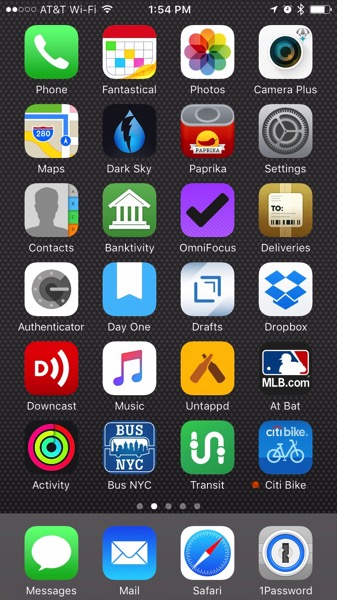
Mobiata’s shutdown made think about how many of my mobile apps I use that rely on a developer’s cloud server to work. As I suspected, it’s a lot. Here are the just apps on my iPhone’s home screen that communicate with a server and why.
iCloud, including my calendar, contacts, email, messages, web browser bookmarks and tabs, photos, music, and activity to share with my friends. I also need a server to use Maps.
Dark Sky to get its hyperlocal weather data.
Paprika to synchronize my recipes across devices and the web browser bookmarket to quickly add recipes.
Bankitivity to synchronize transactions between my desktop and iPhone applications.
OmniFocus to synchronize tasks, projects, and contexts across desktop, iPhone and iPad applications.
Deliveries to synchronize package tracking across devices and get delivery tracking data.
Day One to synchronize journal entries across devices.
Drafts to synchronize text clippings across devices.
Dropbox to access files on my Dropbox.
Downcast to fetch podcast episodes and synchronize across devices.
Untappd to fetch beer data and post my check-ins and notes.
At Bat to stream baseball games and fetch news.
Bus NYC to fetch realtime bus and subway data.
Transit to fetch nearby bus and subway data and to plan routes.
Citi Bike to fetch data on bike and dock availability, posting my trips, and fetching account information.
1Password to synchronize my 1Password keychain across devices.
For each app listed above, my phone is communicating with a different server to post and fetch data. No wonder I need an unlimited data plan.
But what’s even more alarming is the prospect of a server going dark. It’s not so much that the server will fail. Any cloud computing platform is designed to mitigate collapse, such as an extended outage or a hardware failure. But no server is designed to keep running after the developer has ceased to do business: because the developer couldn’t pay their server bills (e.g., Everpix), because the developer couldn’t raise funding (e.g., Avocado) to keep operating, or because the developer died.
At the risk of sounding apocalyptic, it’s not a matter of if these cloud services will go dark, it’s a matter of when. And when it does happen, each app and the data contained within it will go dark, just as the lights in the developer’s office and their Amazon AWS account.
Last week, was a whirlwind week in the US wireless industry. Before then, only T-Mobile and Sprint offered unlimited data plans to all customers, but by the end of the week all four major carriers offered them. On Monday, Verizon announced that it was resurrecting its unlimited wireless plan, and a few days later, AT&T announced that it was also offering an unlimited wireless plan to all customers, whereas it was only available to DirecTV subscribers.
Although all four carriers offer 4G LTE data, there’s an implicit hierarchy among the wireless carriers in the United States. At the top, AT&T and Verizon have the most mature networks that cover the most terrain and carry the most expensive pricing. Below them is a second tier of carriers, namely T-Mobile and Sprint. Their networks cover less terrain and are perceived as being less robust in terms of network connectivity. Because of this perception, they have been the most aggressive about pricing. That is why they were, before last week, the only carriers to offer unlimited plans.
To be sure, the only reason Verizon’s and AT&T’s unlimited plans emerged last week was because of the competitive pressure that T-Mobile and Sprint have put on Verizon and AT&T. Verizon likely felt the squeeze was too much to bear and capitulated with its new unlimited plan. AT&T likely saw this and quickly reacted by expanding its unlimited plan to everyone. It’s safe to say that none of this would have happened had AT&T been allowed to acquire T-Mobile.
For readers who are carrier-agnostic and are considering switching to an unlimited plan, Mac Rumors has produced a nifty comparison between the four unlimited plans offered by the majors. But as the kids today say, YMMV.
Unlimited vs. Unlimited
I was immediately intrigued by these new offerings. I have been on the grandfathered unlimited data plan that AT&T once offered with iPhones. I have held on to it despite the introduction of less-expensive metered data plans and a $5-per-month rate increase instituted last year that was due to increase by another $5 next month. Another factor in my intrigue was that I have two other lines on my plan: one is on a metered 3 GB data plan (labelled below as “Line 2”) and the other (labelled “Line 3”) is on a grandfathered unlimited data plan. I also receive a 20% employee discount through my employer.
Here’s a comparison between my current talk, text, and data plan; my current talk, text, and data plan after the impending rate hike in March; and AT&T’s new unlimited plan. (All prices are rounded to the nearest dollar, and they do not include taxes and fees, which I am considering as a wash between all these plans.)
Description
Talk, Text, Data Plan
Effective March 2017
New Unlimited Plan
Base Plan
$60
$60
$60
Text Messaging
$30
$30
—
Line 1
$35
$40
$40
Line 2
$45
$50
$40
Line 3
$40
$40
$40
Discount
-$32
-$34
-$12
TOTAL
$178
$186
$168
As you can see, the new unlimited plan for all three lines is about $10 less than the current talk, text, and data plan that I share with two other lines.
The savings are greater after factoring in the impending $5 per-month rate increase, effective March 2017, for each grandfathered unlimited data plan (Lines 1 and 3 in the table above). I guess AT&T’s strategy to bully us off the unlimited data plan finally worked!
Another factor to consider is that Line 2, the metered plan, often exceeds the 3 GB data allotment. AT&T bills the data overage at $10 per GB. I considered switching to a plan with more data, but the next higher offering is $50 for 5 GB. There is no “discount” for more data at this next plan; it’s similarly priced at $10 per GB, as is the base 3 GB and any associated overages. With Line 2 on an unlimited plan, there will be no more overage charges.
If I add a fourth line, it will, in effect, be free because AT&T reimburses you $40 each month for that fourth line, after a two–billing-cycle “waiting” period. That would significantly reduce the price per line.
But Why Stick with AT&T?
Although AT&T’s new unlimited plan is the most expensive of the four major wireless carriers and is the only one that doesn’t offer tethering, I prefer to stay with AT&T for three reasons:
I am receiving $650 in bill credits from AT&T for my iPhone 7. When Apple introduced the iPhone 7 last September, AT&T allowed you to trade-in your iPhone 6 for up to $650 in credit towards an iPhone 7. You could get effectively get a base model iPhone 7 for free. Since I opted for the 128 GB instead of the base 32 GB model, I am paying the extra $100 over 30 months, which works out to about $3.30 per month. Should I leave AT&T, I will have to pay the remaining balance, which is significant.
The AT&T wireless network is superior to the others where I live and work. Although it was hardly true a few years ago, AT&T has a very reliable wireless network in New York, particularly the neighborhoods I frequent. I considered switching to the more affordable plans on T-Mobile or Sprint, but after speaking to friends and colleagues, I resisted switching because those networks are not as reliable as AT&T’s. Moreover, Verizon had a potent 3G network that put AT&T’s to shame. In the 4G LTE era, the opposite is true. AT&T operates a robust network in New York that seems to outperform Verizon’s network, according to the testimony of my friends and colleagues.
Tethering is not a factor. The unlimited plan never allowed tethering so I am not going to miss what I don’t have.
What Should You Do?
An unlimited plan isn’t for everyone. Most mortals use a surprisingly small amount of data, less than 3GB per month, so an unlimited plan would be excessive for them. Personally, I wonder if that’s because most wireless users have conditioned themselves to restrict their data usage for fear of overages. For the majority of those users, I say stick with your metered plan.
But I use a lot of data, regularly between 3 GB and 6 GB, per month, as sometimes as high as 12 GB. I like not having to worry about overages. Also, Line 2 on my plan, the one with the 3 GB plan, would regularly exceed those allotments. I doubt he would be happy turning on “safe mode” to slow down the data transfers to 2G speeds. The unlimited plan works for us, but it might not be the best for you. As I literally said before, YMMV.
Conclusion
In the end, the small but measurable savings between the talk, text, and data plan of yore and the new unlimited plan made a lot of sense. But also, my wanting to stay loyal to AT&T played a significant factor. As much as we all hate the cable company, the airline, and the wireless carrier, AT&T has been just fine for me. I certainly suffered when the iPhone was exclusive to AT&T, as making a phone call or transmitting data seemingly never worked, but in the 4G LTE era, things are different. Of course, this might change when 5G emerges as a standard, but that is still a couple of years away. And if AT&T falters, I’ll be off-contract. I can always switch to another plan or provider.
Update: AT&T announced on Monday, February 27, that it is introducing two new unlimited plans. I’m mulling it over and will repost here about what I think to do.
Partly to torment my students with a long reading, but also to perhaps have them reflect on contemporary issues, I assigned Siegfried Kracauer’s “Mass Ornament” essay to my students in my History of Film class this week.
By a great stroke of luck, Nicholar Baer is delivering a lecture about Kracauer’s writings and film on Wednesday, February 15, at the department of Cinema Studies at New York University. The students in my Tuesday class may get a chance to hear this lecture, but the students in my Wednesday class will not. Our class meets at the same time as this lecture.
Nicholas Baer: Siegfried Kracauer & the Historical Film
This presentation will examine how Siegfried Kracauer addressed the relation between history and poetics in his film-theoretical writings. I will argue that insofar as Kracauer came to define the medium’s “basic aesthetic principle” in terms of engagement with the singular and transitory occurrences of physical reality, he obfuscated Aristotle’s opposition between history and poetry, paradoxically locating the poetics of film in its potential as a historian of contemporary life. Notably, however, the genre of the historical film was problematic for Kracauer, given its efforts to visualize a past that is by definition no longer present. Rather than showing “how things actually were,” in Leopold von Ranke’s famous words, the historical film can only envision “things as they could have happened.” An examination of Kracauer’s extensive writings on the historical film will shed new light on his film theory and illuminate significant developments in his thought from Weimar Germany to 1960s New York. Not least, Kracauer’s texts will provide an occasion for considering cinema in relation to historical-philosophical debates on the dissolving distinction between empirical reality and fictional construction, the history and the story, and the true (das Wahre) and the verisimilar (das Wahrscheinliche)—issues of renewed concern in our own “post-truth” era.
Nicholas Baer: Siegfried Kracauer & the Historical Film
I’m embarrassed to admit that I don’t use OCR for converting documents into plain text as much as I probably should. It is a very handy utility, and it is one that computers have been doing for a long time. Indeed, I remember using OCR in college, at the computer lab where I worked, scanning a single page of print and watching the software read it and turn it into plain text with astonishing accuracy. It seemed like magic.
And what did I do with that magical text? I took that text, put it in a Word document, and printed it out.
Today, there’s many more useful things to do with OCR, particularly for scholars and academics. One example is to share the text of historical primary documents instead of an image files of the documents.1 For years, I have been sharing with my students readings as PDF files, but in the mobile-first era of the web, it makes much more sense to share a webpage that someone can easily read on a mobile device, instead of a PDF that they have to pinch-and-zoom—or even print out—to read.
Earlier this week, I began sharing with my students plain text files, instead of PDF scans, of readings not available in their textbooks. Doing this yields some benefits:
They can resize the text, either bigger or smaller.
They can parse the text to read with a browser utility like Apple’s Safari Reader or a read-later application like Instapaper.
They will appreciate the much smaller file size, like 100 times smaller, especially for students using a mobile device.
If sharing readings as plain text instead of PDF files makes so much sense, what took me so long?
Honestly, I didn’t know what tool I should use. I can’t remember the software I first used in 1997, but it’s safe to assume it doesn’t exist anymore. Acrobat offers OCR, but I haven’t had a Creative Cloud license since the days of Creative Suite 3. Although I have a lot of apps that can scan and convert to text, such as the one for a Doxie scanner or PDFPen+Scan for iOS, most of these readings are in PDF already. I don’t want to print and scan them just to do OCR.
Lo and behold, Google Drive converts PDF to text. I just learned about this yesterday, and I like the results. To use Google Drive for OCR, follow these three steps:
Upload your PDF file to Google Drive, if it’s not there already.
Right-click on the file
Select Open With > Google Docs
After a few minutes, depending on the size of your document, you can see the converted text. The results are pretty good. Obviously, the clearer and better your text, the more accurate the OCR will be. One cool feature is that it “respects” the pagination and hyphenation of your original document. If your document has page headers or page footers, those will appear. Since I’m interested in capturing only the text—not the pagination or hyphenation—of the document, I have to remove those from my final text document.
The nice thing about having a plain text document is that you can lightly format it as needed. Since I use Markdown, I recommend using a Markdown-capable text editor to parse the text. You’ll have a relatively unadulterated text file and can export it to any format you want from there. You can export to PDF, unstyled HTML, or RTF. And as I did with my first try at OCR in 1997, you can even print it.
One of my big complaints about #kidstoday is that are keen to share screenshots of a website—or worse, a photos of computer display with the browser window—instead of sharing the URL of the site. ↩
About a week ago, film professor and documentarian Michael Chanan posted an excerpt from his documentary film The New Cinema of Latin America (1983). The excerpt includes an enlightening interview with Cuban filmmaker Julio Garcia Espinosa. At the time, he was the head of ICAIC, the Cuban Film Institute founded by the Castro regime after the 1959 Revolution, but he is perhaps best remembered for writing the essay “For an Imperfect Cinema” in 1969.
Espinosa’s interview highlights two very compelling issues of the post-1959 period of filmmaking and, apparently, his own thinking about “imperfect cinema”:
The filmmakers were influenced by the European New Waves and documentary. Espinosa describes how Italian Neorealism was a model for quality filmmaking and recalls how someone criticized his early film work for ignoring this important movement. He also notes the influence of Michaelangelo Antonioni and Ingmar Bergman, as well as generally referring to the documentary work that grew in the decades after World War II.
The filmmakers were determined to create their own cinema. Espinosa discusses how filmmakers had adopted many tricks to mask the racial markers of Afro-Cubans, but they were determined to forgo that practice in favor of representing the Cuban people in their truest light.
Earlier this week, Brooklyn’s Other Half Brewing celebrated their third anniversary, on the same week that they were named by Rate Beer as one of the ten best breweries in the world.
To commemorate their anniversary, they released cans of a special 3rd Anniversary IPA.
“You don’t save Other Half’s 3rd Anniversary IPA for a special occasion. The special occasion is when you drink it.”
I didn’t actually get to buy this beer, nor did I visit Other Half in Carroll Gardens, Brooklyn, on the occasion of their third anniversary. But I did see that this special brew is available at a local beer establishment down the street from me. And yes, I do plan on getting a can before they run out.
When I first saw the can, I didn’t correctly identify the producers. I didn’t think “Other Half Third Anniversary.” I thought “Threes,” as in Threes Brewing, another brewery located in nearby Gowanus, Brooklyn.
The case of mistaken identity is notable because, about a year ago, Threes Brewing was engaged in a dispute over their name with another brewery in southern New Jersey, named Three 3s. Brooklyn’s Threes even took their case to their Instagram followers, asking whether they should pursue legal action against Jersey’s Three 3s.
I chimed in and thought that the different names and wordmarks—as well as their very different sense of graphic design—were enough to distinguish one brewery from another. Also, the two don’t seem to compete in each other’s markets. Threes is primarily in Brooklyn, and Three 3s is in Hammonton, about halfway between Philadelphia and Atlantic City. But my initial confusion with Other Half’s Third Anniversary commemorative can suggests, at least to me, that there’s so much beer out there that it’s almost impossible to not inadvertently release that might run afoul of someone else’s creation or intellectual property.
As the late Umberto Eco wrote, “books always speak of other books, and every story tells a story that has already been told.”
The purpose of a trademark is to prevent a consumer from confusing one product with another and to protect the reputation of the company that holds the legal right to that trademark. Again, I don’t see anyone reasonably confusing one brewery with another, as with Threes and Three 3s. Furthermore, I certainly don’t think that the fine folks at Threes Brewing would ask Other Half to cease and desist: it’s not a neighborly thing to do, and no one owns a trademark on the number three.
In any case, potential trademark clashes such as these are a sign that the craft beer industry is in really good shape. There’s a lot of beer being brewed right now and some day we’ll look back at this period as a golden age of craft beer. We can drink a lot of different beers, and we have no hope of ever drinking the same beer twice. This is a good problem to have.
But alas, the history of every Golden Age ends in one of two ways: with a spectacular crash or slow withering decline. Either way, Golden Ages don’t last forever, and the craft beer industry will be no exception. I can’t tell exactly why the Golden Age of Craft Beer will end, but here are some theories:
People’s taste will change and they will stop drinking beer.
There will be too many breweries, and the beer-drinking public will settle in to their choices. The others will die.
Breweries begin to merge and consolidation will take hold of yet another industry.
There will be a hops crisis like the one in 2008. Never forget!
Teetotaling Trump will sign some executive order that will ban all beer that is not the same color of his skin. At least Schofferhofer will remain on the market.
All of this is to say that we should enjoy this period before all we have to drink is something from Goose Island and Ballast Point.
I’ll let you know what I think about that can of Other Half 3rd Anniversary IPA as soon as I get to enjoy one.
In “Trash of the Titans,” the 200th episode of The Simpsons from 1998, Homer runs for sanitation commissioner of Springfield as an outsider on a populist platform. Tired of having to take out his trash to the curb and paying for its collection, one of his first actions in office is to have his sanitation workers do household chores for everyone in Springfield. His platform was simple: “Can’t someone else do it?”
Last summer, I heard about a new app that seemed to reflect everything was wrong with the Silicon Valley, the tech industry, and the so-called gig economy: Pooper.
Pooper is an app that allows dog owners to take their dog for outdoor walks and let the dog defecate. Once your dog has dropped its deuce, you…
open the app
photograph the spot where your dog pooped
someone arrives to scoop your dog’s shit
To put it in high-concept terms for Silicon Valley: It’s Uber for poop. Pooper!
If this sounds too good—or too awful—to be true, don’t worry, it is most certainly fake. And don’t confuse it with the other Pooper for when you need to poop.
Pooper is less an app or a work of comedy than it is a piece of conceptual art.
Pooper’s website contains all the hallmarks of a tech company. There’s a sandwich video, a familiar-looking mobile app that looks a lot like Uber, and a feature list illustrated with icons.
The Pooper service even mocks other tech services by offering three price points: a basic, a premium, and an unlimited tier.
The project creators intended to criticize the gig economy built into the service sector companies masquerading as revolutionary apps. They see these as contributing “to the downfall of society.”
A few years ago, when I polled students about driving for Uber or running errands on Task Rabbit, they responded favorably to these services and echoed the mantra of gig economy: it’s cool because it lets people make extra money on the side. However, as these students were attending a private university in New York City, I think they were only imagining themselves using these services—to get a cheap ride or have someone wait in line for a Cronut—and not actually working for these companies as independent contractors.
It’s early, but I have started to see a backlash of the gig economy. Pooper was one example that highlighted the other side of the tech-drive gig economy by including a link to “Become a Scooper.”
The Scooper page drew attention to the labor that the tech economy eliminates from view. The page is preposterously bright and sunny, promising that it’s good for everyone in terms of cleaner cities with less dog waste, extra income for scoopers, and a better environment with compostable scooping materials.
It sounds great, right? Sure, until you realize you’re picking up dog shit.
These mom-tech apps deliberately hide the humans doing the actual work. Seamless is perhaps the most deliberate about it: promising zero human contact. That’s a bold promise because a human has to prepare your food, another human has to package it, and one more has to deliver it. I suppose you could ask the delivery guy to leave it on the step outside to ensure you make truly have no face-to-face contact… or perhaps you don’t consider the delivery guy to be a human.
The same is true for similar apps. There’s always a human—probably a poorly paid one—doing the work you tapped on your app to avoid doing. It’s time to recognize that.
This past year, 2016, was the hottest recorded year on earth, according to a bunch of scientists. The previous record was set in 2015, which broke the record set it 2014. If one year is an anomaly, two might be a coincidence, and three might indicate a trend, right?
The New York Times has compiled the data and made a fun tool that lets you search for how much warmer (or cooler) many cities were than their normal. As much fun as this tool was, the results were pretty chilling for some places that I searched. Not only were the temperatures all above normal, there were multiple records set. Here’s a sampling of some places I searched. (All temperatures are in Fahrenheit because I don’t speak Celsius.)
New York City
Average temperature of 57.2°, 2.2° above average. No wonder we played softball in early February.
Record highs in March at 79°, and in October at 85°, and record low in mid-February at -1°
Los Angeles
Average temperature of 67.1°, 1.6° above normal.
A bunch of record highs in February around 90° and another record high in July at 97°.
Santa Barbara
Average temperature of 60.8°, 1.7° above normal.
The always mild Santa Barbara set a few records in February, April, and July at 87°, 86°, and 94°, respectively.
Palmdale, Calif.
Average temperature of 65°, 0.5° above normal.
My parents town experienced some serious heat in February at 82° and tied a record at July at 108°.
Portland, Ore.
Average temperature of 56.5°, 2.1° above normal
Record highs abound with 62° in February, many days in the 80s in April, a couple of days at 98° in June, a whole lot of days between 90° and 99° in August, and days in the upper 60s in November.
Clearly, I have a coastal bias so I asked my friend for his hometown. It’s Detroit and despite its northern latitude, it was also considerably hotter than before, but it was still pretty darn cold.
Detroit
Average temperature of 52.9°, 2.5° above normal
Record highs set in February at 56°, in March at 71°, in November at 73°, in December at 53°, and tied a record at 98° in July. Note: don’t move to Detroit! Is it really that cold?!?
This is all something to think about as we enter a new age in US history, where climate change is something either a Chinese hoax intended to depress the American economy or something that is actually real but not something cause by humans.




 RSS - Posts